
Web Download
Download purchased daily files directly from Your Data, inspect a sample, and choose the right output format.
Use web download when you need a small number of files and want the fastest manual path from the app.
Web download happens in Your Data.
Before You Start
- you have already purchased the data
- you are in
Your Data - you are working in
Filesview, notMonthview
If you switch to Month, the table becomes a grouped summary. Return to Files when you need row-level actions.
What You Can Do From Each File Row
Each file row exposes three actions:

Sample: opens a preview of 10,000 lines and lets you download that sampleDetails: opens the in-app analysis view for that day, including integrity and trading statisticsDownload: starts a direct file download for the selected day
Download One File
- Filter or sort the table until you find the file you want.
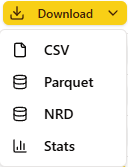
- Open the row menu from this button:

- Choose the output format.
- The browser starts the download immediately.
Choose The Right Output
| Output | Use it when... | What you get |
|---|---|---|
| CSV | you want maximum compatibility or quick inspection | one daily .csv download from the selected row |
| Parquet | you are moving the file into pandas, Polars, DuckDB, or another analytics workflow | one daily .parquet download from the selected row |
| Stats Files | you want the companion JSON summary instead of the full tick dataset | one daily .stats.json download |
| NRD | you are working in a NinjaTrader-oriented workflow | one daily .nrd.gz file from the selected row |
Details Is Not The Same As Stats
Do not treat Details and Stats as the same action.
Detailsopens the in-app analysis view for the selected fileStatsin the download menu downloads the companion stats file
Use Details when you want to inspect the day inside the app. Use Stats when you want the raw JSON summary in your own workflow.
When Web Download Is The Wrong Tool
Web download is intentionally simple:
- one row at a time
- one daily file at a time
- best for quick manual retrieval
If you need many files, move to SFTP Download.
If you want a terminal-based bulk workflow without manually browsing SFTP folders, move to CLI Downloader.